Table of Contents
- Abstract
- Theory of Finger Printing and Web Application Finger printing
- Usage of Web Application Finger Printing
- Methods of Web Application Finger Printing
- Disadvantages of Current automated Solutions
- Case Study of various Web Application finger printing Softwares
- Inherent Flaws in the Design of Current automation Tools
- Thwarting Web Application Finger Printing
- Enhancing Current Tools and future directions
- Conclusion
- References
Abstract
This Paper discusses about a relatively nascent field of Web Application finger printing, how automated web application fingerprinting is performed in the current scenarios, what are the visible shortcomings in the approach and then discussing about ways and means to avoid Web Application Finger Printing.Theory of Finger Printing and Web Application Finger printing
Finger printing in its simplest senses is a method used to identify objects. Same Term has been used to identify TCP/IP Stack Implementation and was known as TCP/IP finger printing. And similar usage has been extended lately to identify web applications Installed on the Http Server. If you know your enemies and know yourself, you can win a hundred battles without a single loss The Art of War (Chapter 3) in the same spirit Web Application finger printing is performed to identify the Application and software stacks running on the HTTP Server. Web Application finger printing is at its nascent stage as of now, however we are observing increasing awareness about it and large number of automated solution emerging in the market.Usage of Web Application Finger Printing
Web Application finger printing is a quintessential part of Information Gathering phase [4] of (ethical) hacking. It allows narrowing / drilling down on specifics instead of looking for all clues. Also an Accurately identified application can help us in quickly pinpointing known vulnerabilities and then moving ahead with remains aspects. This Step is also essential to allow pen tester to customize its payload or exploitation techniques based on the identification and to increase the chances of successful intrusion.Methods of Web Application Finger Printing
Historically Identification of Open Source applications have been easier as the behavior pattern and all the source codes are publically open. In the early days web application identification was as simple as looking in the footer of the Page of text like Powered by <XYZ>. However as more and more Server admin became aware of this simple stuff so is the Pen Testers approach became more complex towards identification of web application running on remote machine.HTML Data Inspection
This is the simplest method in which manual approach is to open the site on browser and look at its source code, similarly on automated manner your tool will connect to site, download the page and then will run some basic regular expression patterns which can give you the results in yes or no. Basically what we are looking for is unique pattern specific to web software. Examples of such patterns are- WordpressMeta Tag
 Folder Names in Link section
 Ever green notice at the bottom

- OWAURL pattern https://<site_name>/OWA/
- Joomla
URL pattern: https://<site_name>/component/

- SharePoint Portal URL Pattern: /_layouts/*
These regular expression’s combined together as a monolithic tool to identify all in one go or as a pluggable architecture for creating one pattern file for each type and work on it. Example of tools using this technique includes browser plugin’s like Wapplyzer and web technology finder and similar tools.
File and Folder Presence (HTTP response codes)
This approach doesn’t download the page however it starts looking for obvious trails of an application by directly hitting the URL and in course identifying found and not found application list. In starting days of internet this was easy, just download headers and see if it’s 200 OK or 404 not found and you are done.

However in current scenario, people have been putting up custom 404 Pages and are actually sending 200 OK in case the page is not found. This complicates the efforts and hence the new approach is as follows.
- Download default page 200 OK.
- Download a file which is guaranteed to be non-existing then mark it as a template for 404 and then proceed with detection logic.
- wp-login.php => wordpress
- /owa/ => Microsoft outlook web frontend.
Checksum Based identification
This is relatively a newer approach considered by far as most accurate approach in terms on application and specific version identification. This Technique basically works on below pattern.- Create checksum local file and store in DB
- Download static file from remote server
- Create checksum
- Compare with checksum stored in db and identified
Disadvantages of Current automated Solutions
As you might have guessed these automation tools have certain disadvantages too.- First and foremost these tools get noisy especially in auto detection modes.
- Large numbers of 404’s can immediately trigger alarms across the places.
- Secondly they generally rely on the URL pattern we gave and fail to look beyond that. However it might be the case that site main link has reference links to its blog which might not be updated and could open gates for us.
- They lack the humanly fuzziness. :)
Case Study of various Web Application finger printing Softwares
WhatWeb
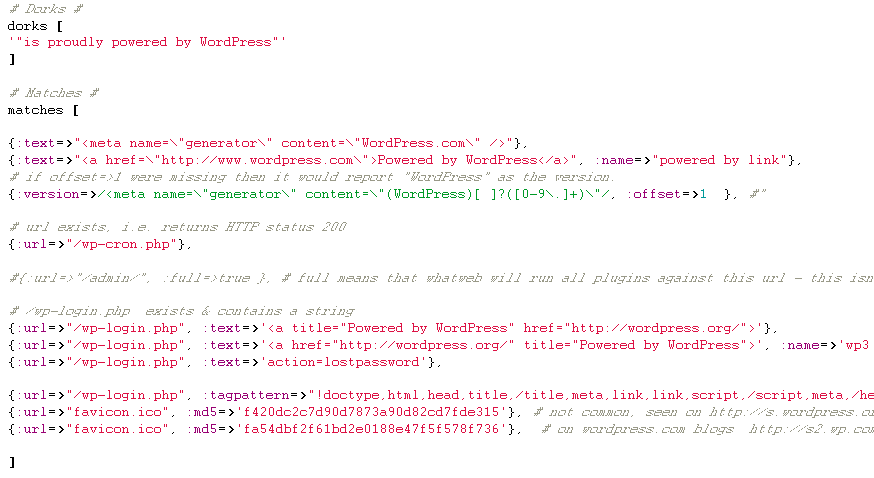
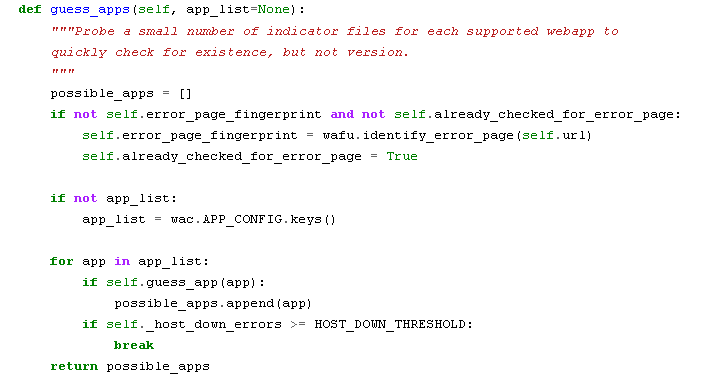
Programming Language: Ruby This is one of the beast application allowing a pluggable architecture with virtually any application detection as you can see in the below script-let this software is performing following tasks.- Google dork check
- Regexp pattern matching
- File existence checker
- File Content checker based on file name
- Md5 based matching.
Wapplyzer
Programming Language: JScript Wapplyzer is a Firefox, Chrome Plugin, and works on only regular expression matching and doesn’t need anything other than the page to be loaded on browser. It works completely at the browser level and giv results in form of icon’s.
BlindElephant
Programming Language: Python This is a new entrant in the market and works on the principle of static file checksum based version difference. As described by author at its home page, The Static File Fingerprinting Approach in One Picture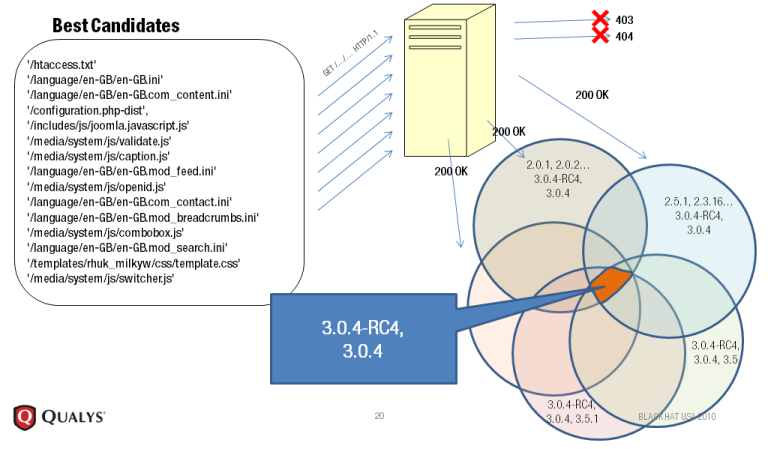 This again allows this software to work for both open-source software and closed source softwares, the condition is that the person running BlindElephant need to have access to source code to map all static file fingerprinting.
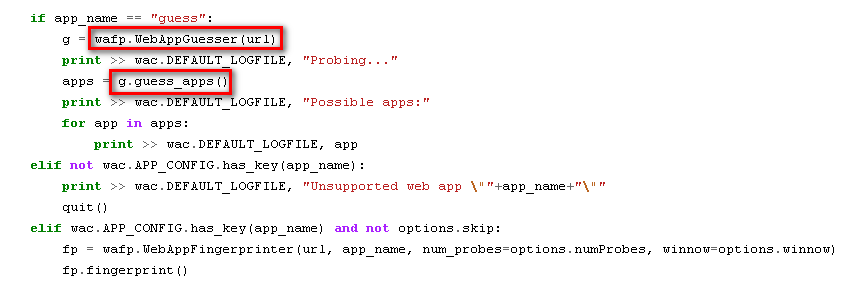
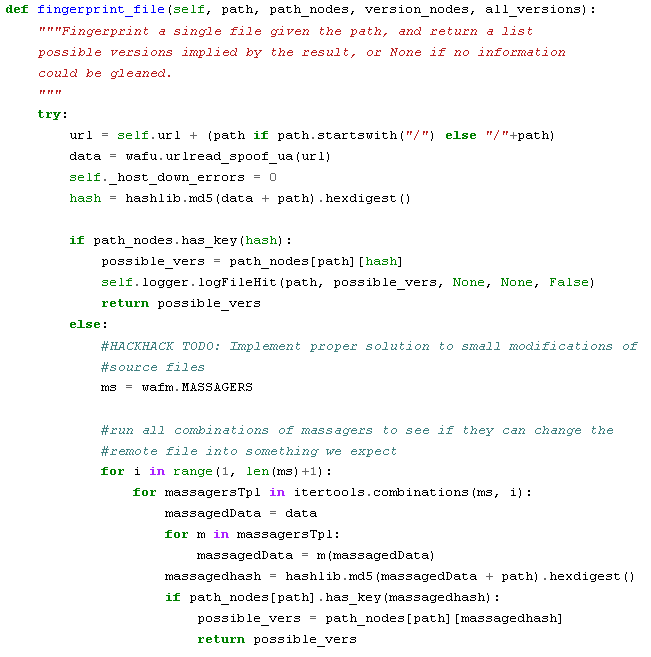
Basic logic is here :
This again allows this software to work for both open-source software and closed source softwares, the condition is that the person running BlindElephant need to have access to source code to map all static file fingerprinting.
Basic logic is here :
Plecost (Specialized Scanner for Wordpress)
Programming Language: Python Plecost works on a simple principle of finding right files. It derives the version of Wordpress from readme.html as shown below: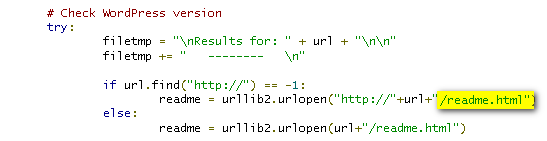 This section works for all open source Wordpress plugin’s which are available from wordpress.org site.
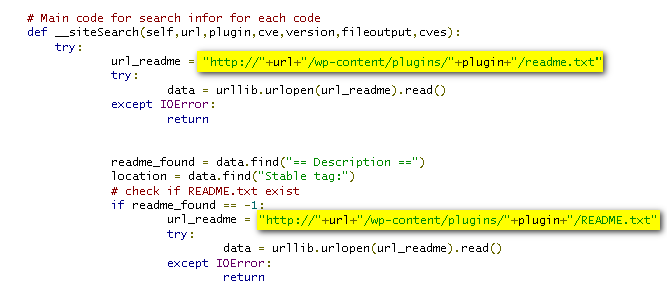 Basically it tries to fetch the readme.txt for each plugin and then based on that deduces the version of appliance installed on this server.
Note: wordpress.org makes it a mandate for every plugin author to have a correctly formed readme.txt file and hence chances of finding these files are too large.
Basically it tries to fetch the readme.txt for each plugin and then based on that deduces the version of appliance installed on this server.
Note: wordpress.org makes it a mandate for every plugin author to have a correctly formed readme.txt file and hence chances of finding these files are too large.
W3af Wordpress finger printer
Programming Language: Python W3AF aims to be the metasploit of web, and hence is attracting quite an attention now a day. Below listed is among the first hand plugin’s of web application finger printing in W3AF. This plugin again take a retro approach looks for exact file names and paths and moving on to look for specific data inside the file and if exist then deduce that application is Wordpress. This highlight is to stress on the fact about paths and flaws which we will be discussing after this section.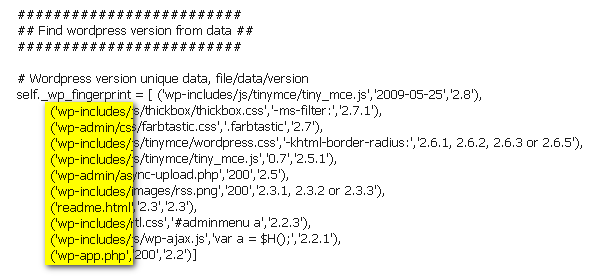
Inherent Flaws in the Design of Current automation Tools
If you have looked carefully in the above details you will find lots of alarming things.- All the tools work on assumption and have very low chances of cross verifying themselves.
- Filename X means Z plugin. Or
- Folder Q in site means software is used irrespective of the actual usage of the product or not.
- Tools are very relaying (except blind elephant which give a probability) - over confidence is dangerous
- They claim to be dynamic however remain static at large parts. (dynamics is only in replacing the front domain name)
- Static path’s
- dependency on static filename
- As already suggested Noise can ring alarms.
- Even when we talk about checksum based approach then again we fail to remove the above 2 constrains and on top of that we have a fundamental flow in this approach
 Let’s analyze the statement
- Comparing Static files at known location
- Precomputed hashes
Thwarting Web Application Finger Printing
HTML cleansing
This is one of the oldest methods of controlling what you don’t what others to see. Few things to keep in mind.- META or generator tags are not required and can be removed.
- Most free software’s ask you to give credit however they don’t explicitly mention that give credit at footer of every page, you can customize that. Also any GPL product gives you the right to modify your content and keep it to yourself till you decide to sell it.
- Comments such as TO-DO / FIXIT if made should be kept at source code / programming language control, avoid HTML comments for any information / clue.
File and folder Restrictions
One of the application specific finger printing applications is Plecost for Wordpress. As seen above it works on a straight forward hit a file if 200 OK with valid content plugin exist otherwise doesn’t exist. Similar kind of approach could be easily thwarted by using simple htacess based rules or redirection policies. Example to beat Plecost all you need is block access to readme.txt (.html) from outside. The reason why I suggest block and not removal as in case of removal during next upgrade all the files will be restored, however blocking will help in all cases. #blocking access to readme.txt <files readme.txt> order allow,deny deny from all </files> This should be enough to block access to readme.txt, similar steps could be performed to block majority of other files/folders. What we are trying to do here is allow disallow everyone direct access to important filesChecksum Management
This particular section is a hypothetical section as of now describing theoretical approach to beating the checksum based software versioning scheme. People are welcome to enhance this approach and integrate this in the defensive tool chain. As already described above checksum based approach has inherent flaws in the design and hence could be forced to fall in its own trap. I have divided this part in 3 basic sections, text files, binary files, and incremental chaos. The general approach for all the below is as listed- Change the path as path is one static link in the whole chain.
- We might not be able to change name so change content. (Name changing can take a lot of time and effort not by pen tester but by developers to get things right.)
Static Text Files (HTML, JS, CSS)
This section will deal with various techniques you can use to thwart checksum’s.- You can just manually edit all relevant file add just about any character even a single character can change the whole checksum.
- You can write a script to append text at the end of file.
- Preferred option would be to intermix the actual content with seemingly relevant content in the whole text area.
- Things to keep in mind while performing this exercise would be
- If you insert text in between HTML keep check on tags like <pre> <textarea> <text><object><span><table>, any of these tags may bark out in case you add some random text in between.
- Text to be inserted could be a normal comment or a complex comment made out of random characters. It could also be a properly formatted and placed HTML data.
- Here again we need to be one step ahead and think how this protection could be nullified, in case of comments a person can simply remove all comments from both ends and then compare text. So we need to make sure our scrambler content is not just comments but mix of comment and tags. Also tags should not be in predefined order / pattern otherwise regular expressions could be used to detect such material and remove it.
- In Java script you can add some random named function requesting some valid looking random name div and span’s however keep in mind that the regular expressions should not be able to isolate this particular text we add otherwise we fail the actual cause of it.
- In CSS we can work on the above tags generated in HTML and JS to hide or change data on them.
- We need to make sure that data is not collated at one places rather spread across the whole file.
Image files (PNG, JPG, ICO, GIF)
Manipulating image files would be a much more daunting task as this involves binary files. Things we need to keep in mind- Using any image conversion tool can degrade the quality of image.
- We need to maintain aspect ratio and resolution of all images.
- If manipulating at image level output quality should be hundred percent with no added compression.
- Changing the alpha channel value i.e. changing transparency from 0 to 1% can significantly change checksums and still retain image.
- Binary level edit by directly editing the binary file and adding exif data or extra data to the end of image data.
- Manipulating color code of a fully transparent pixel.
Incremental chaos
This is my favorite part; as we are already trying to confuse the automated solutions why not add more spice to the recipe. So here is my next hypothetical solution which is targeted towards making automated solutions more useless. When we are trying to hide our actual platform why not provide them something to reliable determine and give result, in simple terms We will hide our original software using above described approaches, effectively the software might give a no result, relying on the confidence these automated solution present why not make sure the output is there and when reported with full confidence that could lead to lots of chaos. So this is how we will proceed with this approach- Hide original framework.
- Add static content from a different framework in usual locations.
- Add sections on page listing css / js or html page links to this bogus cms.
- Content should not conflict with the actual framework.
- Folders placed should not overwrite the existing framework.
- CSS / JS / HTML page link in content pages is necessary to thwart the attempts of regular expression based scanners looking for content in html data.
- Being the original files (non-tampered) they will also give positive id to checksum based systems.
Enhancing Current Tools and future directions
This section is where I have tried to suggest some approaches which could be followed to work towards better scanners.New Approach for Tools
Right now tools rely heavily on regular expressions and as such could be easily defeated by providing fake text in comments or similar format. Parsing engines should be more intelligent and should be looking at the actual content and not whole text. Another approach which could be deployed is instead of checksum based comparison we should have actual diff and weighted scores could be used to validate the differences however this would be resource intensive approach but could yield some good results however problem would be in version identification.Cross Referencing other techniques & using Human Common Sense in Tools
We should always cross refer other inputs example Apache server detected with aspx extension and we found through all automated checks that “SharePoint server” is present. This doesn’t seem right to human mind. Similar approach should be embedded in the logical section of the automated tool. There are subtle hints provided by each framework in implementation of various protocols similar to http finger printing [2] that approach could also be used to detect the presence of a specific application. Example of such implementation could be RSS/ATOM[6], XMLRPC[5].Conclusion
This paper can act as a staple food for both offensive and defensive security professionals and I have content for both. Would love to see both side developing tools and techniques based on the above stated methods.References
- AJAX Finger Printing https://img2.helpnetsecurity.com/dl/articles/Ajax_fingerprinting.pdf - Shreeraj Shah : shreeraj dot net-square.com
- Http Print White Paper : https://net-square.com/httprint_paper.html - Saumil Shah : saumil dot net-square.com
- OWASP web application Scanner Specification : https://www.owasp.org/index.php/Category:OWASP_Web_Application_Scanner_Specification_Project
- Fingerprint_Web_Application_Framework : https://owasp.org/www-project-web-security-testing-guide/latest/4-Web_Application_Security_Testing/01-Information_Gathering/08-Fingerprint_Web_Application_Framework
- RFC 3529 : XMLRPC : https://tools.ietf.org/html/rfc3529
- RFC 4287 : RSS : https://tools.ietf.org/html/rfc4287