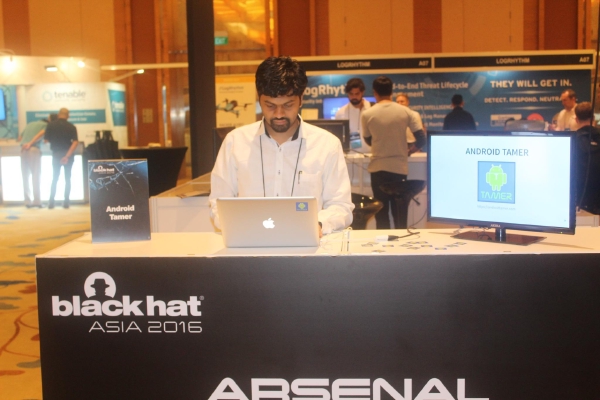
This BlackHat ASIA 2016 Arsenal session demoed Android Tamer, a virtual machine purpose-built for Android security professionals. The deck runs through the toolset bundled in the VM, the custom convenience features layered on top, the apt-get repository that keeps everything updated, and a demo lineup covering decompilation, automated assessment, multi-device management, MobSF, and building your own distribution.
Summary
The WHAT slide set the frame: Android Tamer is a virtual machine for Android security professionals, supporting VirtualBox, VMWare, and Vagrant/Ansible provisioning. The WHY slide made the time argument: it saves the hours otherwise lost finding and installing tools, configuring them, ensuring all the other tools still work after each change, and managing updates for each one separately.
The tool list covered the ground an Android assessor needs: adb, fastboot, and the Android SDK for device work; dex2jar and enjarify; apktool; jad, jd-gui, jadx, and jadx-gui for decompiling; drozer for dynamic analysis; DFF and ddrescueview for forensics; SQLiteManager and SQLiteMan for databases; Burp Free and OWASP-ZAP for interception; pidcat for logging; and MobSF and Cuckoo-droid, both flagged in-progress at the time. Custom features layered convenience on top: easy management of multiple devices, one-liner commands like apk2java and drozer_start, scripts for automated analysis, software updates over an apt-get repository at repo.androidtamer.com (alpha phase at the time), and every tool pre-configured in PATH so nobody switches directories.
Beyond the VM itself, the deck pointed at the project’s community side: the @AndroidTamer Twitter account for Android security news, the Facebook page, security enhancement documentation, and a curated learning page at androidtamer.com/learn_android_security.
The demo block ran five items: application decompiling with apk2java, automated assessment with drozer_checks, multi-device management through adb list, MobSF, and building your own distribution on the Debian-compatible repository. The adb list mechanics got their own slide: add entries to ~/.adb_list in “ABC;SERIALNO” format, for example echo “abc;1234567890” » ~/.adb_list, giving named references to each connected device. The closing suggestions slide invited the audience to suggest more tools, report issues, contribute to the project, and write articles and blog posts.
Key Themes
- What Android Tamer is: a virtual machine environment purpose-built for Android security professionals, deployable on VirtualBox and VMWare or provisioned with Vagrant and Ansible.
- Why it exists: it removes the overhead of individually finding, installing, configuring, and maintaining dozens of Android security tools, and of keeping them working together.
- Included tools: device interaction (adb, fastboot, Android SDK), reverse engineering (dex2jar, enjarify, apktool, jad, jd-gui, jadx, jadx-gui), dynamic analysis (drozer, MobSF in-progress), forensics (DFF, ddrescueview), database analysis (SQLiteManager, SQLiteMan), proxies (Burp Suite Free, OWASP ZAP), logging (pidcat), and fuzzing (Cuckoo-droid in-progress).
- Custom features: one-liner commands such as apk2java and drozer_start, multi-device management, automated analysis scripts, apt-get repository updates, and all tools pre-configured in PATH.
- Demo: apk2java: one command runs the full APK-to-Java-source pipeline, extracting, converting DEX to JAR, and decompiling to readable Java in a single step.
- Demo: drozer_checks: predefined drozer security checks run against Android applications as an automated baseline before manual analysis.
- Demo: adb list: a custom device manager backed by ~/.adb_list, with “NAME;SERIALNO” entries enabling quick switching and identification across test devices.
- Demo: MobSF: Mobile Security Framework integration for automated static and dynamic analysis of Android applications inside the VM.
- Build your own distribution: the Debian-compatible package repository lets users customize and extend Android Tamer into tailored team environments.
- Community and learning resources: curated learning material at androidtamer.com/learn_android_security, Android security news via @AndroidTamer and the Facebook page, and security enhancement documentation.
Notable Points
- Platforms: VirtualBox, VMWare, and Vagrant/Ansible provisioning.
- Bundled tools: adb, fastboot, Android SDK; dex2jar, enjarify; apktool; jad, jd-gui, jadx, jadx-gui; drozer; DFF, ddrescueview; SQLiteManager, SQLiteMan; Burp Free, OWASP-ZAP; pidcat; MobSF and Cuckoo-droid marked in-progress.
- One-liner commands such as apk2java and drozer_start collapse multi-step operations into single commands.
- Updates flow through an apt-get repository at repo.androidtamer.com, in alpha phase at the time, and all tools come pre-configured in PATH with no directory switching.
- adb list demo steps: add entries in ~/.adb_list, entry format “ABC;SERIALNO”, for example echo “abc;1234567890” » ~/.adb_list.
- Learning resources live at androidtamer.com/learn_android_security, with news pushed through @AndroidTamer on Twitter and the project’s Facebook page.
- Takeaways: download the VM for a standardized, reproducible team environment, run drozer_checks for baseline assessments before manual work, and keep tools current through the repository instead of tracking individual releases.
- Contribution paths listed on the closing slide: suggest more tools, report issues and challenges, support the project by contributing, and write articles and blog posts.
Notable Quotes
“Virtual machine for Android (Security) Professionals”
“Saves time while Finding and installing tools Configuring them Ensuring all other tools are still working Managing updates of each tool”
“One liner commands (apk2java, drozer_start etc)”
“All Tools pre-configured in PATH (no need to switch directories)”
“Follow Us @AndroidTamer to get Latest Android News”